
The UZ801 is a 4G/LTE USB modem which is built on top of a Qualcomm Snapdragon 410 (MSM8916, with MDM8916 modem.) It does not have a screen, but it does have LEDs which can be used to signal the same status as the green/red bar on the Orbic hotspot. More info can be found here.
I can confirm that the stock Android 4.4 KitKat install has a way to enable USB debugging by visiting a specific link on the web interface, and that this device also definitely has a /dev/diag interface that is accessible. I can’t remember if it is only accessible after rooting or if it is just randomly accessible as-is.
I write to ask if anyone has attempted a port before I try it, just in case others have found it to be impossible or not worthwhile. Alternatively, I would like to know if there is any interest in this platform. Thanks in advance!
I’m not aware of anybody attempting a port for this. I don’t think there’s anything speaking against adding new devices, especially if somebody contributes the necessary patches and will maintain them. A lot of our devices in the functional section have rayhunter support “just for fun.”
Some questions:
Hi @untitaker, thanks for your response!
It is worth noting that the CPU has only 2 of the cores enabled on the stock Android-based firmware, probably to avoid overheating as they did not exactly engineer any cooling solution. That being said, I don’t think I’ve felt the device heat up. There is 384MB of RAM on the SoC, I hope that is sufficient. Storage-wise, it has 4GB of eMMC(?) in the form of an SK Hynix NAND flash chip. I have successfully run it from a power bank for hours and hours, and I would imagine the runtime would improve dramatically if it is not doing its normal task of beaming a Wi-Fi hotspot. I got the device from a bargain bin for ~$3 a year ago :smile: , which mirrors the origin stories of many I have read from online.
It is available on AliExpress [2][3], at least in the US where I am right now. This means that these specific links may not exist in other countries, I’ve seen that happen before, but I can almost guarantee that the devices themselves are sold. Any device that is shaped like an oversized USB mass storage drive and says “4G LTE MODEM” on the top is 99% going to be the UZ801. eBay is also another place where I have seen them for sale.
As an aside, there is a fully functional Debian image for these devices, however I haven’t been able to (re)gain access to the QC DIAG interface under Debian for the life of me.
rayhunter is definitely going to work fine as far as specs go. the devices we currently support have 1 core, <100MB RAM, and much less storage too. the only concern i would have is that this seems to be a whitelabel modem with no specific branding, so you might find that the exact rooting procedure might vary slightly between the various offers on aliexpress, which might make it hard to offer a fully automatic installer.
but generally this looks like a great potential addition, especially because of the price.
So far, I believe that all of them share a common basis in the web interface. At the very least, all of the ones I have seen have the secret backdoor URL that enables USB debugging, after which you can
adb reboot bootloader, and failing that, all of them have the magic button you can press to reboot into fastboot. Ideally from there the install script could flash a premade image where rayhunter has already been applied for maximum assurance of compatibility, but there is also potential to simply install it piecewise via ADB as with other platforms.I will look into how Rayhunter works in general, then see if I can at least get its functionality working on my UZ801, and when we get to that stage I will think about how to best automate the install steps to fit in the installer script.
Some updates:
curl http://192.168.100.1/usbdebug.html, wait for a reboot, and then it’ll get adb access to copy over the files and do the setup.tmobile(T-Mobile TMOHS1) device target to support this one, seeing as that one also manipulates the /sys/class/leds to do the status indication. This device hasred,greenandwifi(blue) leds in the folder, all accessible and lighting up fine. I think the red LED is only ever used during startup to indicate the modem isn’t “ready”/booted up fully yet, so there’s little to no possibility of a false warning illumination.So far so good, rayhunter-daemon runs on the device:
One problem is that there is no init.d, so I need to find out where all the init scripts live and how to hook misc-daemon and rayhunter-daemon in there.
Edit 2: It turns out that the error is originating from the
dfincluded in busybox on the device. It does not have an -h option. This is a weird device that also does not have vi…All done~! PR incoming in the next 30 minutes :sweat_smile:
See https://github.com/EFForg/rayhunter/pull/511.
hey @Tunas1337 i’m looking at aliexpress again and it seems there’s a variant of the UZ801 that has two LEDs. did you get this one? it looks identical on the backside.
Mine is the black one (if there is only one black one…) I am away from home, but is this one:
It has three LEDs (or three LED components in two LED housings): red, green and blue. This leads me to believe that even though there are only two icons/light pipes on the model you showed, the mobile bars are red/green and the wifi is blue. Thus it is still compatible.
Next step for this device would be to try and figure out if the modem processor’s NVRAM can be modified with tools like QPST/QXDM to unlock all the bands. Optimally, that can later be replicated with QCSuper (which is open-source, multiplatform and unencumbered by a need for double-illegal Qualcomm internal software piracy.)
Sorry for kidnapping this issue, but can this USB modem send and receive SMS messages?
What about phone calls (like some Huawei USB dongles)?
I am asking because I am looking fir alternatives to Huawei USB dongles for RasPBX: https://github.com/MatejKovacic/RasPBX-install
No phone calls (I tried), and SMS is a maybe. It didn’t work when I tried, but there looked to be provisions for it in the firmware.
I have ordered a similiar device (the white red device). However, adb is by default available.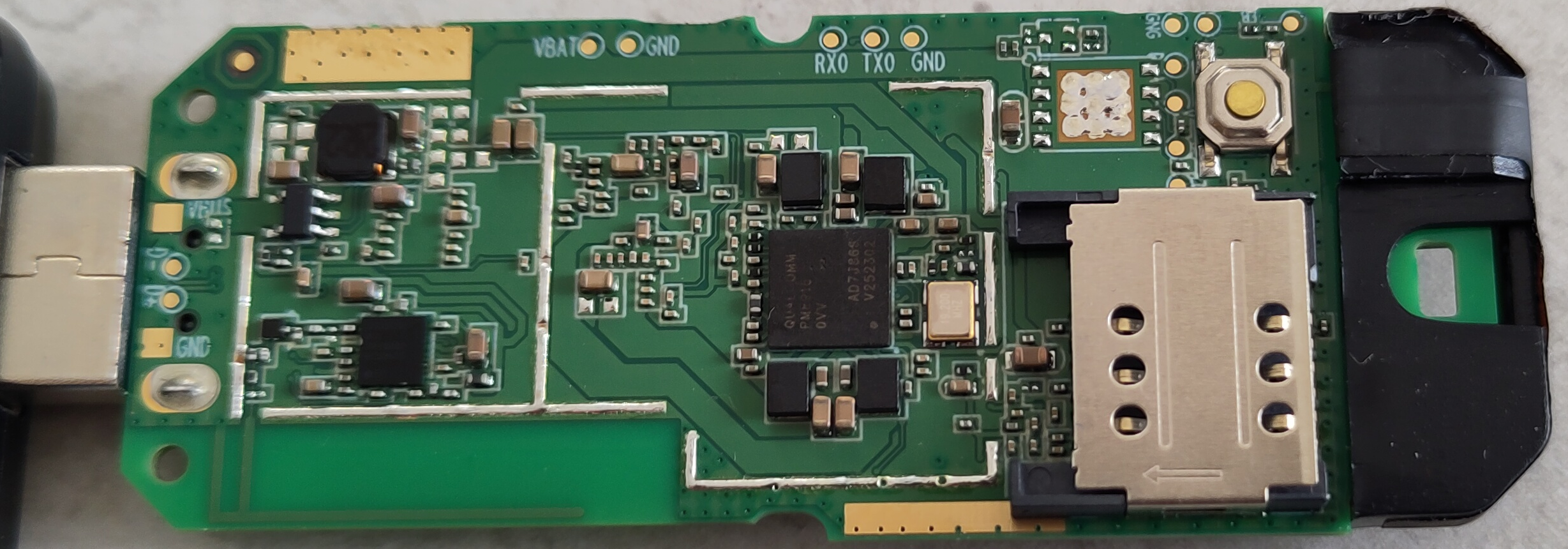
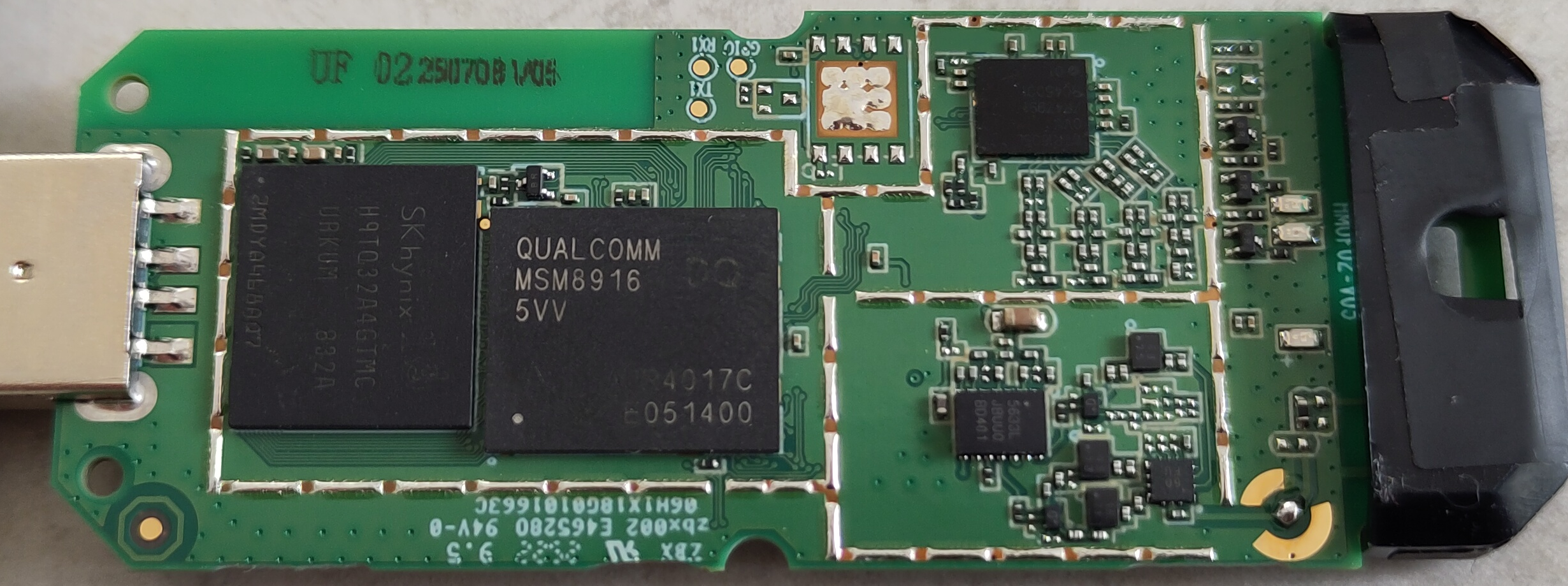 The shielding is missing by factory
build.prop.txt
The shielding is missing by factory
build.prop.txt
To get root you need this command
setprop service.adb.root 1; busybox killall adbd.I was trying the 0.6.1 version. This didn’t work with the installer.
the manual way:
download the rayhunter release, extract it and move to the folder:
the mentioned init script (
/system/bin/initmifiservice.sh) is missing:However there is a different entry possible:
connect to the 4G-UFI-XXXX wifi and open
http://192.168.100.1:8080/index.htmlso far soething does not work. either the device reboots after 3 minutes (without sim card) or wifi crashes after 5 minutes (with sim card)Very interesting… Thank you very much for taking the time to experiment and for the in-depth report.
I will definitely attempt to amend the usbdebug.html request to actually ensure that a webserver is present and that the request worked. If it doesn’t, we will skip that step and see if there’s adb already.
As for the adb connection timing out, make absolutely sure that you don’t have an adb daemon running in parallel: you must run
adb kill-serveror else there’s contention over which adb daemon is associated to the device.I think that at least some of the things you highlighted could help make a more universal installer as originally planned. I have no problem with using init.qcom.post_boot.sh instead, if it is more widely present (I am quite sure it will be – I will have a chance to check my unit today.) I think it would be a better idea to tack the Rayhunter launch command line at the end of the init script instead of unit-specific modifications like replacing RIDL (on your unit) or the mifiservice (on my unit.) As far as I’ve been able to tell, none of the default services conflict with Rayhunter’s duties, but maybe this RIDL thing on yours was/will conflict with it.
One thing that I want you to try is to run the RIDL service and Rayhunter to see if that solves the several-minute reboot issue, as that sounds like a watchdog timer that awaits RIDL (which is now gone as you sedded it out of the script.)
I used the
/data/SelfHost/startRIDL.sh &because it does not exists. I just took ‘post_boot’ as best option to add something to not interfere with the boot process. but it seems that this place is used by other people too ( https://sswifi.net/tutorial/23-4gwifi410-m8916.html)In my case
/proc/cpuinfoshows 4 cores. But so far no reboots. the leds are not enabled permanently, they are blinking. But his could be due the main application is running.So I have this device: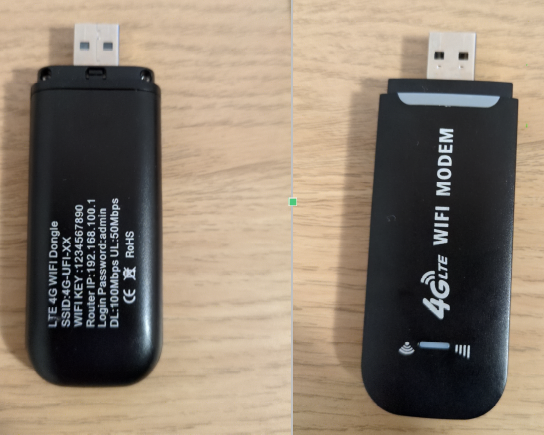
lsusbsays:When I plug in the device, it generates WiFi network, and I need to connect to this network. It seems device does not provide network via USB.
This is the webUI interface accesible at `http://192.168.100.1/home.asp:
I ran:
P. S. I did not have SIM card in the device.
Hmm, perhaps this device doesn’t have the USB debugging backdoor or it is named differently. I definitely have never seen this interface before. However, it’s also very likely that either we can find the new backdoor, or there’s some pins to be bridged on the PCB (or even a button to be pressed!) to boot into fastboot or EDL, at which point you can overwrite the firmware and software image with one from a version of this stick that supports Rayhunter.
I also have such a thing (
Bus 003 Device 009: ID 05c6:90b6 Qualcomm, Inc. Android) and the installer at least gives me a root shell. Unfortunately something has gone wrong and it’s not bringing up wifi or rndis any more … which is fine. It never worked with my carrier so maybe it’s defectivewell…next device. this device is supported via command without any hassle. (adb is available with root id) This device has only two cpus active. (In my case the usb cable is only for charging, no data connection.) build.prop-mf800.txt


It is usually sold as H807 pro and should have more lte bands. However there are no leds for rayhunter.
Interesting!! This one is probably going to be able to reuse the Orbic display driver and not have to worry about LEDs. Pretty much, draw a line at the top of the screen.
I don’t think it’s necessarily related to the UZ801, but maybe it is; do you know what CPU it has in it? You said two cores so it’s probably not an MDMxxxx like the Orbic. If it has an MSM8916, then it’s definitely a cousin of the UZ801 :)
Machine: Qualcomm Technologies, Inc. MSM 8916 (Flattened Device Tree), model: Qualcomm Technologies, Inc. MSM 8916 512MB MTPmf800_dmesg.txt 05_dtbdump_Qualcomm_Technologies,_Inc._MSM_8916_512MB_MTP.dtb.dts.txtMSM_8916 has always 4 cpus physically , but sometimes two are deactivated. Mostly because of missing a heat spreader and sufficient surge power supply over usb-a.
Yes indeed, that is the case. In the UZ801 stick that I have, 2 of the cores are disabled on the original (Android Kitkat) system image, and reenabled only in Debian.
So I opened my device and here are the pictures:
There is s small plastic cap on the side and under it seems something as a switch:
In the cap there is metal:
I tried to run the exploit with the cap off, but it was still timeout.
Interestingly, you can bypass password by just opening direct link:
http://192.168.100.1/home.asp(you can not see that these days much…).lsusbsays:The plastic cap is the LTE antenna :) Also, I just re-read your original message that says the device does not provide any network over USB, only Wi-Fi. That means we’d have to find an exploit in the web interface to execute arbitrary shell commands and get wireless adb, or just do the setup that way.
some interesting links from hackernews today:
https://news.ycombinator.com/item?id=45250676 https://wiki.postmarketos.org/wiki/Zhihe_series_LTE_dongles_(generic-zhihe) https://github.com/OpenStick/OpenStick
I didn’t have exact model as @coelner did but i have found out the device is mising su binary and, using edl i had a complete dump of the devices if you guys need the dump, I’ll including the link later on
Something interesting that i found out is that the screen is an actual screen just like an Android phone but striped down so much. Basically this can be use just like any normal android apk to display information.
One more interesting thing, the device has pinout for sdcard, i found out H909Pro version have it soldered on by default.


I suggest to make a new thread for this, it’s not the Uz801
Yes i think we should, the device have such potential, battery, screen, etcs btw the device have a different adb PID/UID
Did this conversation resume anywhere? On a separate note, Maskuratech list this device on their website and say there’s an SDK available. I’ve contacted them about it and am waiting for a response. I’ll update this thread (or the main thread, if there is one) if/when I get a response.
It didn’t but i’d urge you to create a new thread and link it here.
I just received my UZ801 unit (https://www.aliexpress.com/item/1005009936066487.html), model 4GDONG001. As there are multiple slight variations in HW and SW, I was unable to use the installer. However, I managed to run rayhunter manually. My steps were based on the tutorial by @coelner in this thread, but I had to modify them a bit.
As I have no experience with this project or Android, I can’t be sure that it is working correctly. So please advise how to check if packet capture works as it should and how to log better.
Overall, my unit SW-wise is similar to or the same as @coelner’s unit: /system/bin/initmifiservice.sh is missing, busybox deployed without symlinks, adb debug on, root available, etc. While testing rayhunter as a standalone it managed to operate for around 3h before rebooting at most; other times it crashes fast as @coelner reports. I am not a programmer or developer, so the lower-level Android environment is new to me. When I understand what logs to collect and how rayhunter works, I will be able to provide more information for fixes and improvements. This device is a very low-cost entry to rayhunter, so investing time in its support is worth it (IMHO).
Here are the steps I took to get it working manually, with a few pictures and build.prop file as attachments for further inspection. I am using Arch Linux for this deployment.
I was surprised how easy it was to access the device and enable root, so that is the first step.
Confirm that root is active.
The next step is to make the rayhunter directory in the /data folder, mount system as R/W, and reinstall busybox with symlinks to needed tools. Otherwise, rayhunter will fail to start.
Now you should be able to run regular tools like “cat” or “free -h” from the shell so that rayhunter can access them to function properly.
The next step is to prepare the environment on your computer to push and pull files. Download the latest rayhunter build for Linux ARM 32-bit version (currently it’s rayhunter-v0.10.2-linux-armv7.zip), extract it, and use that directory as a base for further actions - pushing and pulling files.
Let’s push the rayhunter binary and config file to the device. But first, prepare the config file; here is the config I used. It is mostly default config with a defined device for the rayhunter binary to use.
Save it as config.toml. Then it’s pushing time with correct file permissions.
At this point, you can already test rayhunter from the shell, see if it’s working, and inspect logs.
/data/rayhunter/rayhunter-daemon /data/rayhunter/config.toml &Open the default link in your browser: http://192.168.100.1:8080/index.html . If it runs, then close the app and let’s setup auto-start.
First, you need to pull the current /system/etc/init.qcom.post_boot.sh script bash file that is used by the system to run commands and programs on startup.
adb pull /system/etc/init.qcom.post_boot.sh .Then edit that file’s last lines.
That commented bash script is a non-existent file (at least on my device), so it should be fine. The last line runs rayhunter on device startup.
Then push it back and set file permissions.
Lastly, tidy up things and reboot.
The device should reboot and rayhunter should be available.
Here is its web interface:
rayhunter log in standalone mode:
And how it looks on the web:
Physical pictures from device:
Device ID if plugged into USB:
Bus 001 Device 074: ID 05c6:9024 Qualcomm, Inc. Androidbuild.prop file:
build.prop.txt
If I find something interesting to report, I’ll edit this post. Feel free to comment and suggest improvements/fixes, as this is my initial impression with rayhunter and Android on this level.
Thanks much, let me see what I can find about that PCB.
Could you tell us where you ordered it or better yet include a link?
Could you upload a copy of the init.qcom.post_boot.sh file so I can take a look?
For the archive:
init.qcom.post_boot.sh
(it contains my edits)
With these instructions I managed to install Rayhunter to UZ801. Web interface starts (no SIM in UZ801) adb shell setprop service.adb.root 1; busybox killall adbd /data/rayhunter/rayhunter-daemon /data/rayhunter/config.toml &
Sync clock worked ok
lsusb shows Qualcomm, Inc. Android
adb devices device usb:1-2 product:msm8916_32_512 model:msm8916_32_512 device:msm8916_32_512 transport_id:5
Anyone who is following this thread who has one of the UZ801 variants which aren’t working, can you reply to this if you still have one and can test a new Rayhunter installer on the device to see if it works for your varient?
I most definitely can :) I apologize for dropping off the face of the earth. Where do I find it?
Can you build from source? I have it on my own repo https://github.com/BeigeBox/rayhunter/tree/feature/improve-uz-installer
I have same kind of uz801:
Bus 003 Device 008: ID 05c6:90b6 Qualcomm, Inc. Androidstarts as root the standard install failed with same error message. So i did try your code ( compiled from github):
the reboot takes time, maybe adb connection starts too early ?
After some other research on forum I tried :
[(https://github.com/EFForg/rayhunter/issues/633#issuecomment-3366310939)]
killing the adb server made the tricks:
adb kill-serverthen I relaunched install from BeigeBox with success.
I also managed to install latest version from official release. ( official procedure for uz801)
my HW version is V 3.31.
I confirm that we can change/add bands with this guide (made for UF02 white/red variant, but it works with UZ801): https://github.com/hkfuertes/msm8916-openwrt/tree/enable_bands But you have to make edl modem backups in case it gets corrupted. However, unsure if the hardware antenna supports the added bands and there is no calibration data.